Needles: age encryption on your iPhone and iPad

age encryption for iOS

Needles is my new app for encrypting and decrypting files and text on iPhone and iPad with age, a simple, modern and secure file format.

It’s the companion app I always wanted for my PaperAge CLI utility. PaperAge makes paper backups of secrets, and Needles lets you scan the QR code on one of those backups, type in the passphrase, and get your secret back, all from your phone.

It isn’t just for PaperAge, though. Needles works with any age-encrypted file or text:

  • Decrypt with a passphrase, an age (X25519) key, or an SSH key (ed25519 or RSA)
  • Paste encrypted text, or scan it from a QR code
  • Generate new age keys, or import existing ones
  • Keep keys on the device or sync them with iCloud Keychain
  • Open age files straight from Files and other apps

Everything happens on your device and Needles collects no data.

Find out more and download it at needles.matiaskorhonen.fi.

Piranhas is no more

Due to circumstances beyond my control, Piranhas has unfortunately been discontinued.

Over the years, running this service has become increasingly difficult.

First of all, over the years Piranhas has lost access to some Amazon alternatives. Book Depository was first purchased by Amazon and then shut down entirely. Wordery summarily shut down their affiliate programme and API access and is in fact not operating at all at the time of writing.

Secondly, Amazon has done their best to obfuscate shipping costs until the last moment in the checkout process. There was never an easy way to get programmatic access to shipping costs, but it was possible to do so with a bit of manual labour. However, this is no longer possible as they don’t publish comprehensive shipping costs anymore (the shipping costs vary based on individual items).

The final, and fatal, issue is that Piranhas has, without advance notice, lost access to the Amazon Product Advertising API. Without PA API access, it is impossible to search for books or look up prices for them. My Amazon affiliate account remains in good standing but price comparison sites are apparently not something that Amazon wishes to encourage.

So long, and thanks for all the fish,
Matias

P.S. feel free to buy something through one of these affiliate links if you’d like to send a final bit of affiliate income my way: 🇺🇸 Amazon.com, 🇬🇧 Amazon.co.uk, 🇨🇦 Amazon.ca, 🇩🇪 Amazon.de, 🇫🇷 Amazon.fr, 🇪🇸 Amazon.es, or 🇮🇹 Amazon.it

P.P.S. this post is a copy of the EOL message on piranhas.co

Once more unto the breach

tiny ruby conf logo


I’m pretty sure that after every conference that I’ve ever organised, I’ve loudly proclaimed that my organising days were behind me.

Yet here we are. Hope to see you at tiny ruby #{conf} in November.

DJI drone videos and Apple Photos

If you own a DJI drone and have imported videos from it to your Apple Photos library, you may have noticed that the GPS coordinates are not recognised in Apple’s software.

This is because DJI writes the GPS data to a different metadata field than what Photos.app expects. I don’t know if this is a bug on DJI’s or Apple’s side, but it’s annoying nonetheless.

Luckily, we can use exiftool to extract the GPS coordinates and the macOS avmetareadwrite CLI tool to fix the issue.


→ Read more…

Beer Styles 3.0

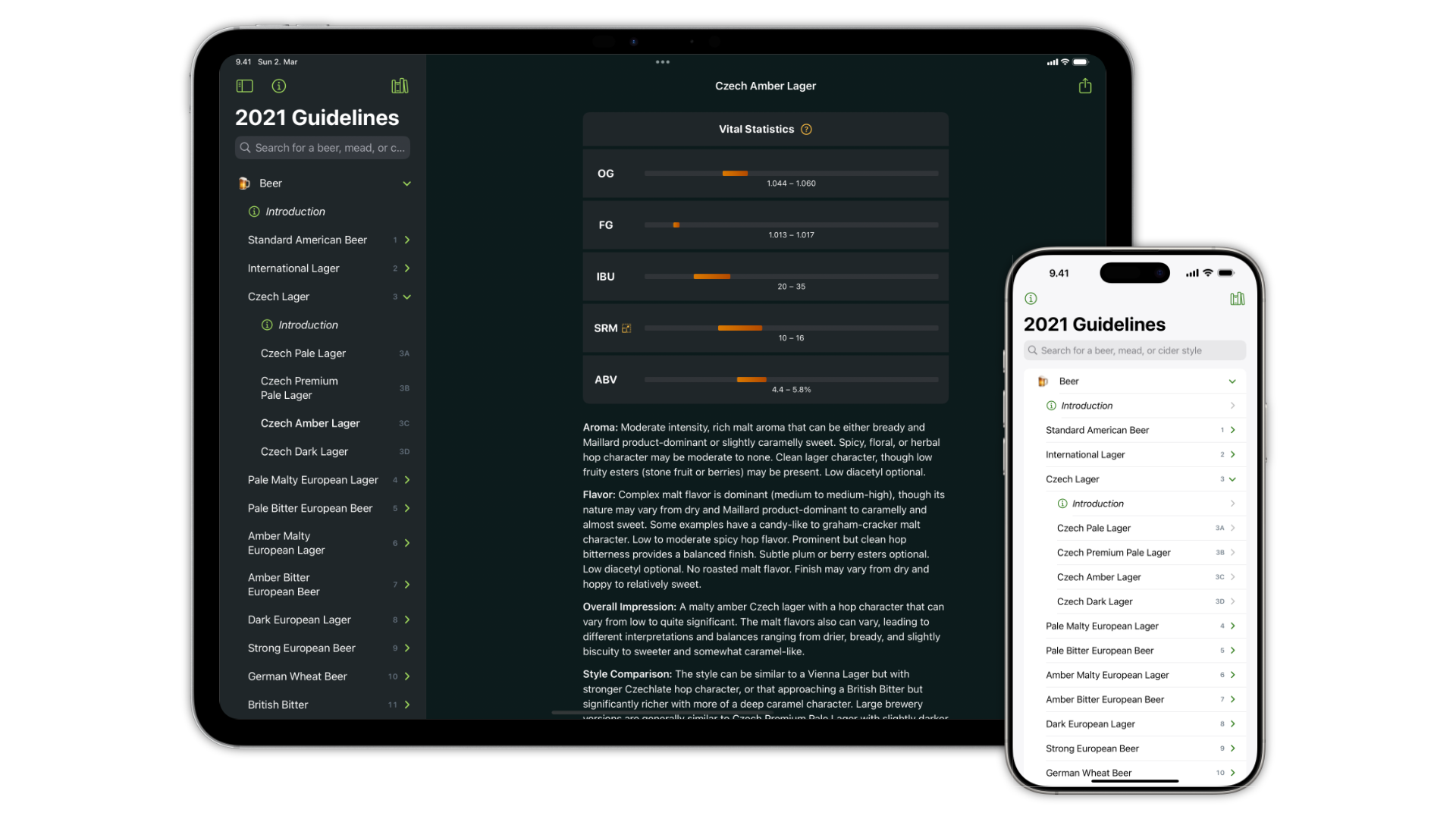
Beer Styles 3 on an iPad Pro and an iPhone 16 Pro Max

Beer Styles 3.0.0

seems like the perfect date on which to launch version 3 of my Beer Styles app.

Eight years since the last major update, this new version is a complete rewrite of the app. It’s faster, more responsive, and easier to use than ever.

Headline features:

  • The app has been entirely rebuilt with SwiftUI and is snappier and sleeker than ever
  • Now includes the 2021 BJCP beer guidelines, along with the 2015 and 2008 editions.
  • Dark mode support
  • Many small annoyances and bugs have been eliminated

Download it for free from the App Store.

Download on the App Store

Taffy image

Just a quick experiment trying to use the Taffy layout library and image-builder crates to layout and build images in Rust.

This worked well enough to satiate my curiosity and could, for example, generate social share images à la @vercel/og.


→ Read more…

GitHub stars are not an invitation to send me spam

Spam email from ChartDB:

[snip]

P.S.: REDACTED here, co-founder of ChartDB. Why I decided to send you this email? You starred ChartDB on GitHub 💛

Starring your repo on GitHub doesn’t mean that I ever want to receive your spammy emails.

I’m well aware that finding my email address through GitHub is not only possible but even trivial, but that still doesn’t make it okay for you to be a dick about it.

I considered whether I should redact the name of the project from the email, but bad behaviour deserves to be called out.

A very rough guide to notarizing CLI apps for macOS

I just added code signing and notarization for PaperAge macOS binaries using GitHub Actions, so here’s a very rough guide to how I did it.


→ Read more…

On-demand image resizing with Bridgetown

As I recently migrated this blog from Middleman to Bridgetown, I thought I could document one of my Bridgetown customizations: on-demand or build-time image resizing.

Notes

  • In this approach, the originals are stored in the frontend/ directory and should therefore be also accessible via the Bridgetown built-in asset_path helper or through esbuild imports.
  • The resized images are stored in src/images/resized so that they don’t need to be processed by esbuild
  • The resized images contain a digest of the original (CRC32 by default) ensuring that they get reprocessed if the original changes.
    • The CRC hash should be sufficient for detecting changes in the original file in a non-adversarial environment, and it is very fast to compute.
    • The CRC code can be easily replaced with a more robust, though slower, cryptographic hash function if desired
  • On the other hand, I’ve chosen not to add a hash of the generated image to the filename in order to avoid having to keep track of the originals and generated files in a manifest file.
  • I’ve chosen not to commit the generated files to Git, but you might make a different choice based on your needs. If you do push the resized images to version control, make sure to also clean up any versions that are no longer needed.


→ Read more…

Non-scientific hash benchmarks

Which Ruby hash or message digest algorithm is the speediest in Ruby? My cursory Googling didn’t surface an up-to-date benchmark from anyone else so here are some rough results of my own.

Note: These algorithms are not all equivalent so don’t just blindly pick the fastest one! CRC32, MurmurHash, xxHash, and CityHash are all non-cryptographic.

Update 2024-03-11: Added OpenSSL::Digest for MD5, SHA1, SHA256, SHA512, and SHA3

Results

100,000 iterations of hashing a 1 MiB blob of random data.

Chart of benchmark results

The benchmarks were run on an M1 MacBook Pro.

  • Apple M1 Pro with 10 CPU cores (8 performance and 2 efficiency)
  • macOS Sonoma 14.3.1
  • Ruby 3.3.0
  • OpenSSL 3.2.1

The benchmark source code is available on GitHub.